
Canonical Tags vs Noindex Tags: Understanding the Difference
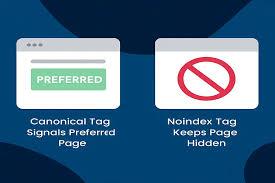
Understand Canonical Tags vs Noindex Tags: Understanding the Difference
Search engines are constantly navigating billions of pages, and large websites often face challenges related to duplicate content, thin pages, and irrelevant URLs. Two of the most important tools in a technical SEO toolkit are canonical tags and noindex tags. While they may seem similar at first glance, they serve very different purposes and have distinct impacts on indexing, crawl budget, and SEO performance. Misusing these tags can result in lost rankings, wasted crawl budget, or improperly indexed pages.
What Are Canonical Tags?
A canonical tag is an HTML element placed in the <head> section of a webpage. Its primary purpose is to indicate the preferred version of a page when multiple URLs contain identical or very similar content.
How Canonical Tags Work
-
Canonical tags do not block pages from being crawled.
-
They consolidate ranking signals, such as backlinks and internal links, to a single URL.
-
They guide search engines on which version of a page to index without removing duplicates entirely.
For example, an e-commerce site might have the same product accessible via multiple category paths. The canonical tag ensures search engines recognize the main product URL as authoritative.
What Are Noindex Tags?
A noindex tag is also an HTML element placed in the <head> section. Unlike canonical tags, noindex tells search engines not to include the page in search results.
How Noindex Tags Work
-
Pages with a noindex tag can still be crawled, but they are excluded from the index.
-
They prevent the page from ranking, which can protect low-value content from competing with high-priority pages.
-
They do not consolidate ranking signals like canonical tags. Instead, any link equity may not fully transfer.
Common examples of noindex usage include:
-
Internal search result pages
-
Duplicate content pages without value
-
Temporary promotional pages
Key Differences Between Canonical and Noindex
| Feature | Canonical Tag | Noindex Tag |
|---|---|---|
| Purpose | Indicates preferred URL among duplicates | Excludes page from index |
| Effect on Crawling | Page is crawled, but signals are consolidated | Page is crawled, not indexed |
| Effect on Ranking Signals | Consolidates ranking signals to canonical URL | Does not consolidate signals; may lose link equity |
| Use Case | Duplicate pages, faceted URLs, product variations | Low-value pages, internal search pages, temporary content |
Understanding these differences is critical for large websites to ensure crawl efficiency, preserve link equity, and maintain proper indexing.
When to Use Canonical Tags
Canonical tags are most effective when duplicate content exists but all pages are still valuable to users. Typical scenarios include:
-
Product pages appearing in multiple categories on e-commerce sites
-
Paginated blog archives
-
Filtered or sorted URLs that do not need separate indexing
-
Syndicated content across multiple domains
By consolidating these URLs with a canonical tag, ranking signals are preserved, and search engines know which page is authoritative.
When to Use Noindex Tags
Noindex tags are appropriate when the page provides little SEO value or should not appear in search results. Common scenarios include:
-
Duplicate or thin content pages that do not contribute to rankings
-
Internal search result pages
-
Temporary promotional landing pages
-
Thank-you pages after form submissions
Noindex ensures that these pages do not compete with high-value content while still allowing users to access them if necessary.
Misconceptions and Common Mistakes
-
Using noindex instead of canonical for duplicates – This prevents link equity from consolidating, reducing SEO benefit for the primary page.
-
Combining canonical and noindex incorrectly – Applying both on the same page creates conflicting signals. Search engines may ignore the canonical if the page is marked noindex.
-
Changing canonicals dynamically per session – Session-dependent canonicals confuse search engines and can dilute ranking signals.
-
Ignoring internal linking and sitemaps – Canonical or noindex tags alone cannot fix duplication if internal links or sitemaps point inconsistently.
How Canonical and Noindex Tags Affect Crawl Budget
Search engines allocate a limited crawl budget per website. Efficient use of canonical and noindex tags ensures search engines focus on high-value pages:
-
Canonical tags: Reduce crawling of duplicate pages over time as search engines learn the preferred URL.
-
Noindex tags: Prevent low-value pages from being indexed, freeing crawl resources for important pages.
For large websites, combining both strategies thoughtfully is essential to maintain crawl efficiency and indexing priorities.
Implementing Canonical Tags Correctly
-
Always use absolute URLs in canonical tags.
-
Avoid pointing canonicals to non-indexable pages.
-
Use self-referencing canonicals on all important pages to reinforce authority.
-
Monitor performance through tools like Google Search Console to check which URL Google selected as canonical.
Implementing Noindex Tags Correctly
-
Place
<meta name="robots" content="noindex">in the<head>section. -
Ensure the page is still accessible if user access is needed.
-
Do not combine noindex with canonical pointing to another URL, unless you fully understand the implications.
-
Review noindex usage periodically to prevent important pages from being unintentionally excluded.
Aligning Canonical and Noindex Strategies
For large websites, a combined strategy works best:
-
Use canonical tags for duplicate but valuable content
-
Use noindex tags for thin, temporary, or low-value content
-
Maintain consistency across internal links, sitemaps, and canonical/noindex tags
-
Regularly audit to ensure tags remain accurate as the website evolves
This approach ensures optimal indexing, protects link equity, and helps search engines focus on high-priority pages.
Monitoring and Auditing Tag Performance
Monitoring canonical and noindex tags is critical for long-term SEO success:
-
Google Search Console: Check index coverage, canonical selection, and noindex application.
-
Crawl tools: Identify missing, misapplied, or conflicting tags at scale.
-
Internal audits: Verify alignment with sitemaps, internal links, and content strategy.
Large websites benefit most from scheduled audits, as even small errors can impact thousands of pages.
Real-World Impact of Proper Tag Management
-
Consolidating duplicate content through canonicals often restores lost rankings.
-
Correct use of noindex prevents low-value pages from competing with high-priority content.
-
Efficient tag management reduces crawl waste, improves indexing speed, and strengthens overall SEO performance.
-
Following these strategies is why SEO Agencies in the USA consistently achieve long-term organic growth for large clients.
Final Thoughts
Understanding the difference between canonical and noindex tags is crucial for website owners, SEO specialists, and technical teams. Proper implementation ensures duplicate content is managed, crawl budget is used efficiently, and high-value pages receive the ranking signals they deserve. Regular monitoring, combined with internal link and sitemap alignment, ensures that these tags support sustainable SEO success rather than creating conflicts.
FAQs (Frequently Asked Questions)
Can a page have both canonical and noindex tags
Technically yes, but it is not recommended. Doing so sends conflicting signals. Search engines may ignore the canonical, reducing its effectiveness. Use canonical for duplicates and noindex for low-value pages separately.
When should I use canonical instead of noindex
Canonical tags are best for pages that duplicate valuable content. They consolidate ranking signals without removing the page from the index. Noindex is for pages that should not appear in search results at all.
Does a noindex tag prevent crawling
No, noindex does not prevent crawling. Search engines can still crawl the page, but it will not appear in search results. This can help preserve crawl budget for higher-value pages.
How do canonical tags affect link equity
Canonical tags consolidate link equity from duplicate pages to the preferred URL. This ensures that backlinks pointing to multiple versions contribute to the main page's ranking potential.
Can I use canonical tags for cross-domain content
Yes, cross-domain canonical tags indicate the original source of syndicated content. This helps search engines attribute authority correctly and prevent duplicate content penalties.
Are canonical tags necessary for paginated pages
Yes, each paginated page should generally have a self-referencing canonical. Avoid pointing all paginated pages to page one, as it can remove valuable content from search indexing.
How often should I audit canonical and noindex tags
For large websites, quarterly audits are recommended. Any site updates, migrations, or structural changes should trigger additional audits to ensure tags remain accurate.
Can improper tag usage hurt SEO
Yes, incorrect canonical or noindex implementation can split ranking signals, reduce indexation of important pages, and waste crawl budget, ultimately harming SEO performance.

 Arabic
 French
 Spanish
 Portuguese
 Deutsch
 Turkish
 Dutch
Dutch
 Italiano
 Russian
 Romaian
 Portuguese (Brazil)
 Greek
Greek